Anime Branch|Seedance 2.0|15s Slime Level-Up|Cinematic Performance Edition
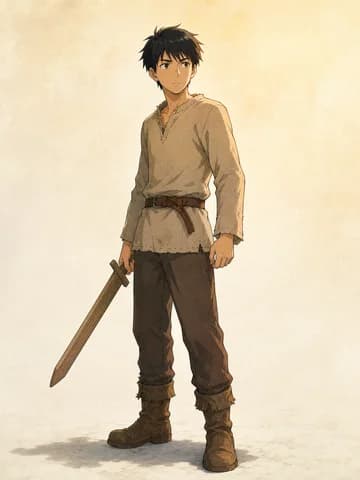
Reference assets: @[Anime Branch] Pre-Transition Live-Action Lead|Identity Asset: controls the live-action identity before the transition, including short black hair, an average build, and a modern beige casual outfit; pose, expression, environment, and lighting may change with each shot. @[Anime Branch] LV.1 Novice Lead|Anime Asset: controls the same person after the transition, the coarse-cloth novice outfit, and the crude short wooden sword; preserve his utterly ordinary LV.1 novice quality while allowing exaggerated anime performance. @[Anime Branch] Blue Liquid Slime|Anime Asset: controls the basketball-sized bright-blue translucent jelly body, dot eyes, and toothless soft mouth; keep it cute, mischievous, and entirely free of realistic threat.
Global setup: Video intent: an absurd but complete first game experience. An ordinary person is accidentally transported, becomes the lowest-level novice, immediately gets his head chewed by a slime, fights back awkwardly, and is rewarded with an unexpectedly grand level-up. The lasting joke is the contrast between the tiny achievement and the enormous celebration. Emotional arc: everyday confusion → sudden weightlessness → shock at arriving in another world → panic and embarrassment under attack → clumsy retaliation → surprise and secret delight at leveling up. Visual style: before the transition, restrained live-action cinematography with low saturation; after blue liquid fills the frame, the image snaps into high-quality theatrical Japanese 2D cel animation with bright cyan-blue and warm gold, fluid smears, squash-and-stretch, readable impact frames, and layered animated light effects. Performance and pacing: hold a brief pause before each joke, make action bursts fast and clear, and allow enough reaction after contact; the camera grows more agile with the emotion while keeping every key action readable. Continuity anchors: the wooden sword materializes in the lead's right hand while blue liquid fills the frame and remains in that hand; the left hand removes the slime and places it directly in front of him. Only after the slime has completely vanished and empty grass is visible may the HUD change from LV.1 and EXP 0/1 to LV.2. Sound design: subdued city ambience and light footsteps, then a low-frequency portal whoosh swallows reality; after the animation transition, add slime boing, sticky squeak, stretch pop, wooden-sword bonk, a short silence, EXP chime, and a bright but slightly overblown level-up sound. No dialogue.
Shot 1|0–3.5s|Reality Tears Open: Camera: a live-action handheld medium shot slowly tracks backward as the tired lead walks through a narrow city alley; the steady rhythm is abruptly broken by blue light under his feet. The portal liquefies the ground, he suddenly loses weight, and the camera drops and rolls with his body until blue liquid rushes forward and fills the frame. Performance: he first looks down in confusion and falls just as his expression changes from “what is that?” to terror. When the liquid clears, the same pose belongs to an anime novice who crashes awkwardly into a sun-dappled fantasy forest with a short wooden sword in his right hand. He sits stunned for half a beat, looks at the embarrassingly crude sword, then notices the quietly glowing LV.1 and EXP 0/1 empty bar beside his head and becomes even more bewildered. Transition: full-frame blue liquid creates the seamless medium change, while a crisp game notification cuts off the low rumble of reality.
Shot 2|3.5–7.5s|Cute Ambush: Camera: hard cut to a grass-level low angle behind the slime, with the lead still sitting dazed in the distance; focus snaps from the slime's rounded back to the lead. The slime compresses to charge, the camera rises quickly along its bounce arc, and performs one short snap-in when it lands on his head with a splat. Performance: the slime covers his hair like a blue jelly hat, its toothless soft mouth happily squeezing the strands while his entire face remains visible. He freezes for half a beat, then his eyes fly open, shoulders hunch, and knees and torso shake in panic. His left hand grabs at the air twice before finding the slime, while his right hand instinctively holds the wooden sword far away, creating a clumsy but readable silhouette. Audio-visual emphasis: use one frame of soft blue impact splash and an exaggerated boing at contact, followed by the slime's satisfied squeak and the lead's sharp inhale; let the forest background sway slightly with the action to heighten the loss of control.
Shot 3|7.5–10.5s|Panic Turns to Indignation: Camera: hard cut to a medium shot from the front-side angle, drifting slightly backward with the pull. The lead grips the slime with his left hand and yanks it forward and upward; it stretches longer like taffy, pauses for an instant at maximum tension, then releases from his head with a crisp pop and springs back into a round form. Performance: his right hand still holds the wooden sword while his left throws the slime onto the grass half a meter directly in front of him. The slime blinks innocently and gives one small bounce. Panting, the lead touches his licked-messy hair as panic turns into humiliated irritation. He steps back, lowers his brows, raises the shabby sword in his right hand, and assumes an absurdly serious novice stance. Rhythm: hold half a beat of eye contact between the slime's innocent blink and the lead's grave pose so the contrast of two weak opponents preparing to duel lands clearly.
Shot 4|10.5–15s|Tiny Bonk, Grand Level-Up: Camera: hard cut to a slightly low full-body composition that forms a clear triangle between the lead, raised sword, and slime at his feet. After a brief pause, the sword makes one clumsy, modest downward tap. The camera gives a tiny shake at contact, paired with a white-blue radial impact frame and an outrageously loud bonk. Defeat result: the slime first flattens into a thin round pancake, its surprised eyes squeezed to the sides, then breaks apart from the impact point into blue light particles. Every piece of gel and every droplet is fully replaced by light particles that rise and go dark; the original spot clearly shows only empty grass, and the slime does not reform. Hold half a beat of silence to confirm the game-style defeat. Level-up climax: the final blue particle shoots into the HUD like EXP, +1 EXP appears, the empty bar fills rapidly, and LV.1 flips to LV.2. A golden LEVEL UP pillar erupts as the camera drops into a quick low angle; hair, clothes, and leaves lift in the airflow. The lead first flinches with his eyes shut, then opens them, stares at the still-shabby sword in disbelief, and lets a hint of pride reach the corner of his mouth. Freeze on an absurd yet heroic golden silhouette.