About AZ8
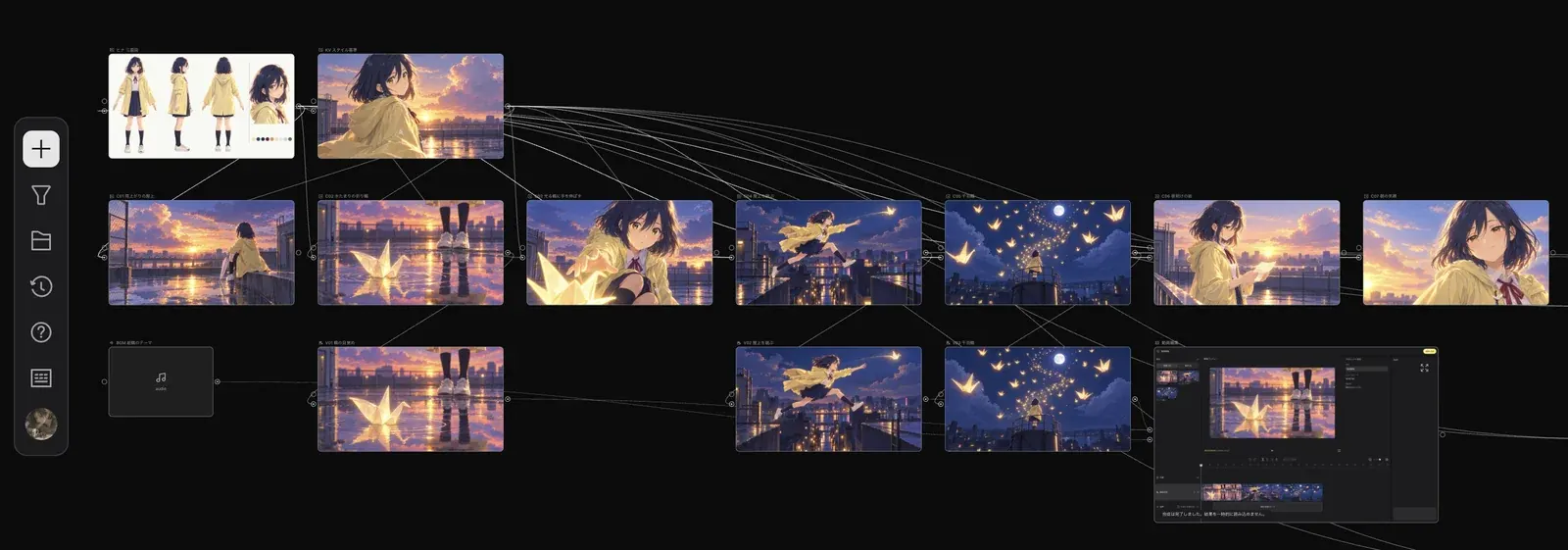
All-in-one workspace for AI video creation: orchestrate multimodal models, master cinematic camera language, and collaborate seamlessly on an infinite canvas.
High-quality visual storytelling is never a single prompt in a chat box. It is an end-to-end craft that begins with idea incubation and storyboard planning, moves through multimodal generation, and ends with precise fine-tuning and editing.
Traditional AI creative workflows trap creators in fragmented, isolated tools: generate an image on one website, download it, upload it to a video model, and finally export it to video editing software to adjust camera shots. Every context switch breaks momentum and dilutes creative control.
AZ8 was built to break these boundaries. As an all-in-one workspace designed for AI video creators, AZ8 deeply integrates an Infinite Canvas, a Multimodal Node Pipeline, and a Proactive AI Agent (Zumi). This empowers creators with cinematic ambition to command the entire journey from the first spark of inspiration to the final rendered cut—all within a unified space.
Core Architecture: Three Pillars in Harmony
AZ8 is designed around the real production pipeline of visual storytelling, structured around three core pillars:
| Core Pillar | Role & Responsibilities |
|---|---|
| Infinite Canvas | The spatial hub of your entire production. Arrange storyboards, organize moodboards and reference assets, link node logic, and preserve branching iteration history. |
| Multimodal Nodes | The visual generation and spatial control engine. Connect and pass data across text, image, video, and audio, with 3D camera and spatial positioning controls. |
| Proactive Agent (Zumi) | Your resident creative copilot on the canvas. Proactively assesses image and video quality, suggests prompt improvements, optimizes layout, and supports multi-turn canvas context dialogue. |
In AZ8, AI capabilities are no longer isolated input fields; they flow organically through interconnected nodes. The agent is not just a passive question-answerer, but an active partner woven directly into your creative pipeline.
Node Pipeline & Spatial Control
Every node on the canvas is both an independent generator and a modular building block:
- Free-Flowing Data Transmission: Upstream outputs directly connect to downstream nodes as references. Link concept frames to image-to-video nodes or use visual pacing to drive audio generation without exporting and importing files.
- Camera Control in 3D Space: Through 3D World and AI Creation nodes, adjust camera height, focal length, and movement trajectories in genuine 3D space, moving away from random guesswork to precise cinematic choreography.
- Asset Preservation & Reuse: Save favorite generated shots, grouped nodes, or style presets straight into your Asset Library to reuse across different projects.
Typical Creative Workflow: From Concept to Delivery
A standard commercial or film project in AZ8 progresses through these stages:
- Import References & Build Moodboards: Drag script outlines, style references, or brand assets onto the canvas to construct the narrative foundation.
- Draft Storyboards & Explore Visual Styles: Work with Zumi to map out shot lists, refine prompts, and generate parallel concept sets using image nodes.
- Drive Dynamic Generation & 3D Control: Connect approved keyframes to video generation nodes, or configure precise perspective and camera positions in the 3D viewport.
- Zumi Quality Review & Branching Iterations: When video finishes rendering, Zumi scores motion smoothness and texture fidelity, letting you branch off alternate takes instantly.
- Team Collaboration & Community Publishing: Invite teammates via secure permission links for real-time review. Export final clips in bulk or publish to the AZ8 Creator Community.
Why Choose AZ8?
- Context Never Lost: Your reference materials, revision histories, and connections remain on the canvas, eliminating the need to re-explain lore or characters.
- From Random Guessing to Precise Control: Visual nodes and 3D camera controls ensure that every adjustment is traceable and reproducible.
- Proactive AI Guidance: Zumi monitors canvas health and offers feedback at critical milestones, catching flaws before final render.
- One Shared Blueprint for Teams: Say goodbye to messy chat zip files and version chaos. The entire team works on the same canvas in real time.
Explore the Modules
Interface & Basics
Create projects, organize asset libraries, and understand the credits system.
Canvas & Nodes
Multimodal matrix covering text, images, video, audio, and 3D World nodes.
Workflow Orchestration
Multimodal pipelines, dynamic shot extensions, and multi-branch exploration.
3D Space & Camera
3D viewport navigation, virtual camera placement, and timeline keyframe animation.
AI Copilot Zumi
Quality assessment, real-time canvas diagnosis, prompt tuning, and co-creation.
Multiplayer Collaboration
Permission-controlled link sharing, real-time teamwork, and credit allocation.