AI video model by MiniMax
MiniMax H3: characters that speak, in 11 languages.
An AI video model whose developer states that dialogue stays stable in 11 languages, including English, Chinese, Japanese, Korean, and Arabic. Write the lines in your prompt and it generates the speaking character's picture and voice in one pass. Up to 2K, with 21:9 widescreen.
You need to sign in to generate. Whatever you enter carries over after you sign in.
- Up to 15s
- Up to 2K
- With audio
- 6 aspect ratios
Last updated AZ8 Editorial Team
What is MiniMax H3?
MiniMax H3 is an AI video model announced in July 2026 by MiniMax, the developer behind the Hailuo video service. It generates video and stereo audio together, and it supports spoken dialogue in 11 languages, including English, Chinese, and Japanese.
Key takeaways
- Generates characters speaking lines in 11 languages, with audio
- On AZ8 it outputs up to 2K, in 6 ratios from 21:9 to 9:16
- Specify only the last frame and it builds the motion leading up to it
Best for
- You want short dramas or ads where characters hold a conversation
- You need dialogue in more than one language for different markets
- You want to work backward from a hero shot to the motion before it
MiniMax H3 videos generated on AZ8
Our editorial team generated each of these on AZ8 and kept the exact prompt and settings beside it.
Japanese dialogue on a school rooftop
- 16:9
- 768p
- 8s
Prompt
夕暮れの学校の屋上で、制服姿の二人の高校生が並んで街を見下ろしている。一人が日本語で静かに「明日も、ここで会おうね」と言う。風の音と遠くの電車の音。カメラがゆっくり回り込む。
A Japanese conversation at a greengrocer
- 16:9
- 768p
- 8s
Prompt
雨上がりの商店街で、傘をたたんだ老人が八百屋の店主に日本語で「今日は何がおすすめ?」と話しかける。店主は笑顔で「今朝のトマトがいいよ」と答える。自然な環境音。
Pampas grass in 21:9
- 21:9
- 768p
- 5s
Prompt
Cinematic ultra-wide shot of a lone traveler in a straw hat standing in a windswept field of silver pampas grass under a stormy sky, slow push in, wind and distant thunder
We transcribed the audio of both dialogue clips and confirmed that the lines specified in the prompts are spoken in Japanese, word for word.
What you can do with MiniMax H3
AZ8 offers five generation modes. Of the four models compared, MiniMax H3 is the only one that lets you specify the last frame on its own.
- Text
Text to video
Put the lines in quotation marks so it is clear who says what. You can add tone of voice and emotion as well.
Prompt
On a market street just after the rain, an old man folds his umbrella and asks the greengrocer, "What's good today?" The grocer smiles and answers, "The tomatoes from this morning are great." Natural ambient sound.
- Image
- Text
Image to video
Use an illustration or photo of a character as the first frame and turn it into a video where they talk and move.
Prompt
The woman in the image looks at the camera and says in a soft voice, "Nice to meet you." Her hair moves slightly in the breeze.
- First frame
- Last frame
First and last frame to video
It bridges a starting image and an ending image. Use it for a change in expression or a scene transition.
Prompt
Her expression shifts naturally from the straight face in the first image to the smile in the last image.
 Last frame
Last frame to video
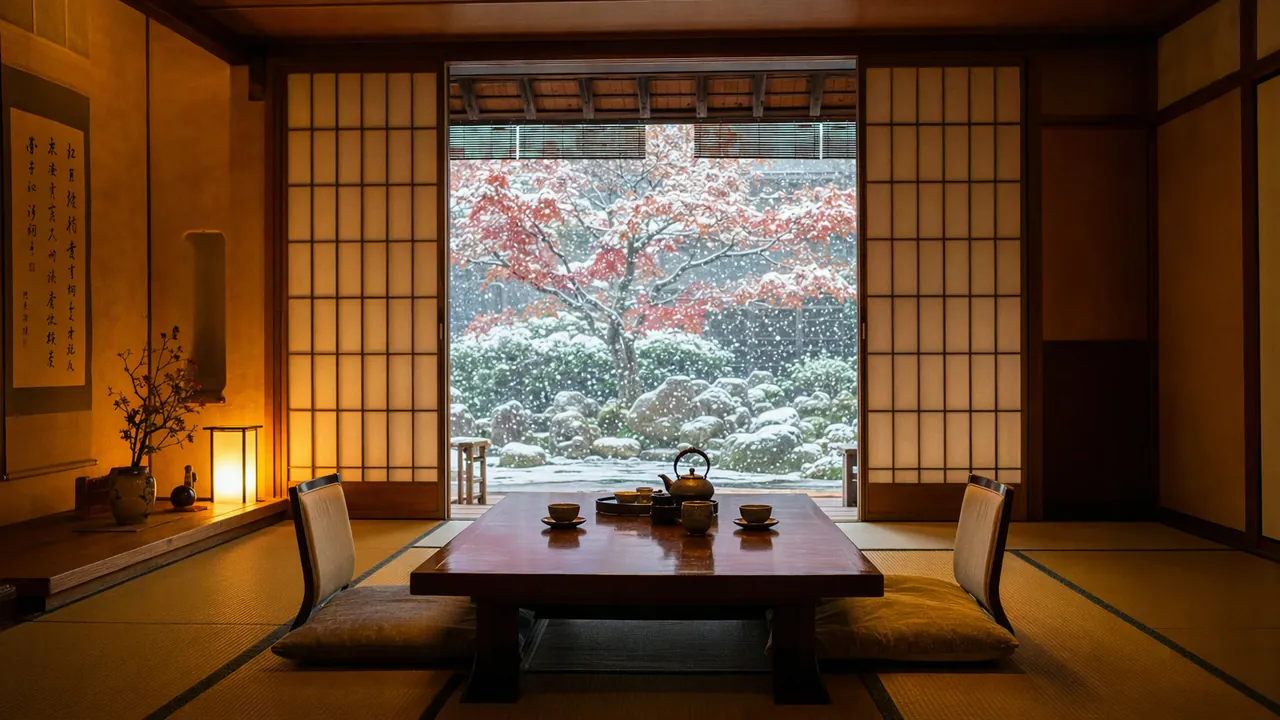
Give it just the image you want to land on, and it generates the motion that leads there. Handy for shots that end on a logo or key visual.
Prompt
The camera pushes slowly forward through a quiet ryokan corridor, the shoji doors slide open to reveal the snowy garden, steam rises from the iron teapot, ending on the tea table with the maple tree in falling snow, soft snowfall ambience
- Image
- Video
- Audio
Reference to video
Reference up to 9 images, 3 videos, and 3 audio clips. Audio references must be combined with an image or a video.
Prompt
The person in the reference image speaks a new line in the voice from the reference audio.
Where MiniMax H3 shines
- 01
Dialogue in 11 languages
The developer states that conversations stay stable in 11 languages, including English, Chinese, Japanese, Korean, and Arabic. Of the four models compared, it is also the only one whose developer explicitly states support for Japanese dialogue.
- 02
2K and 21:9
On AZ8 you can choose 2K or 768p. Pair it with the wide 21:9 ratio for a cinematic frame.
- 03
Working backward from the ending
Because you can specify only the last frame, you can create the hero shot first and generate the motion toward it afterward.
How creators use it
Short dramas with dialogue
Generate conversations between characters with spoken lines to prototype a vertical episodic drama.
- 9:16
- 768p
- 10s
Ads for shops and products
Create a scene where a store clerk introduces a product out loud, without a film shoot. Switch the dialogue language to test versions for other markets.
- 16:9
- 2K
- 8s
Cinematic openings
Use the wide 21:9 ratio to build an opening that lands on your title logo.
- 21:9
- 2K
- Last frame to video
Seedance vs Wan vs MiniMax: AI video models compared
The settings you can choose on AZ8, lined up on the same criteria.
| Feature | Seedance 2.5 | Seedance 2.0 | Kling 4.0 | Wan 3.0 | MiniMax H3This page |
|---|---|---|---|---|---|
| Developer | ByteDance | ByteDance | Kuaishou | Alibaba | MiniMax |
| Max length | 30s | 15s | 30s | 30s | 15s |
| Max resolution | 1080p | 4K | Not selectable | 1080p | 2K |
| Audio | Yes | Yes | Yes | Yes | Yes |
| 21:9 | Yes | Yes | Yes | — | Yes |
| Last frame control | Paired with first frame | Paired with first frame | Paired with first frame | Paired with first frame | On its own |
| Max reference images | 30 | 9 | No stated limit | 10 | 9 |
| Max reference videos | 10 | 3 | 1 | 5 | 3 |
| Max reference audio | 10 | 3 | — | 5 | 3 |
| Extend and edit | Yes | — | — | — | — |
| Open weights | Closed | Closed | Closed | Closed | Open |
MiniMax H3 prompt tips
Write your prompt in English, lines included. The basic pattern is who speaks, where, and what they say, in that order.
Put lines in quotation marks
Wrapping the spoken words in quotation marks separates them from the description, so they are more likely to be read as dialogue.
The girl waves and says, "See you tomorrow."
Add how it is said
Describe the delivery, such as whispering or speaking brightly, and the tone of the voice changes.
She says it quietly, a little embarrassed.
Specify ambient sound
Audio is generated at the same time, so writing sounds that fit the location adds a sense of presence.
A train in the distance, the sound of wind.
MiniMax H3 FAQ
Which company makes MiniMax H3?
MiniMax, a Chinese company, built this model. AZ8 runs its service from the United States, so the AZ8 Terms of Service apply when you use it through AZ8.
How are MiniMax H3 and Hailuo related?
Both are MiniMax products. Hailuo AI is the video generation app MiniMax runs, and MiniMax H3 is the video model announced on July 31, 2026. H3 is the next generation after Hailuo 01 and Hailuo 02, and it is also available in the Hailuo AI app. The official name is MiniMax H3; it is not called Hailuo 3.
Can MiniMax H3 speak English dialogue?
Yes. The developer says conversations stay stable in 11 languages, including English. Put the lines in quotation marks in your prompt.
Is MiniMax H3 free to use?
An AZ8 account is free to create. Generating spends credits, and longer or higher-resolution videos spend more. Check the pricing page for the numbers.
How long can the videos be?
Each generation can be 4 to 15 seconds. Longer pieces are made by generating several shots and joining them.
Can I use it locally or in ComfyUI?
The weights are on Hugging Face under the MiniMax H3 Community License, and ComfyUI provides an official template. Note that the license excludes the United States, the EU, the UK, and South Korea from its permitted regions, and commercial use above US$20 million in annual revenue needs a separate license. The open release outputs about 768p for up to roughly 15 seconds; 2K is only offered in the hosted version. If you want 2K without setting up a GPU, a browser-based service like AZ8 is the easy route.
Can I use the videos commercially?
Under the AZ8 Terms of Service, you may use the videos you generate commercially as long as you comply with the law, respect third-party rights, and follow any model-specific conditions shown before generation.
How do MiniMax H3 Max and Turbo differ?
MiniMax H3 Max and MiniMax H3 Max Turbo are variants in the same H3 family. AZ8 offers each as a separate model, which you can pick from the model list in Studio.
Try it right in your browser.
Signing up is free. Generating videos uses credits.