AI video model by ByteDance
Seedance 2.0: turn the shot in your head into video.
A multimodal AI video model that takes reference videos and audio on top of text and images. Borrow performance, lighting, and camera work from your references, and generate videos with audio up to 15 seconds long and up to 4K, right in your browser.
You need to sign in to generate. Whatever you enter carries over after you sign in.
- Up to 15s
- Up to 4K
- With audio
- 6 aspect ratios
Last updated AZ8 Editorial Team
What is Seedance 2.0?
Seedance 2.0 is an AI video model released in February 2026 by the Seed team at ByteDance, the company known as TikTok's parent. It accepts text, images, video, and audio together as input, and it generates the picture and the sound at the same time.
Key takeaways
- Reference files (9 images, 3 videos, 3 audio clips) let you specify motion and mood precisely
- On AZ8 it outputs from 480p up to 4K, in 6 aspect ratios
- Each clip runs 4 to 15 seconds. Longer pieces are built by joining several shots
Best for
- You want to turn a storyboard or reference clip straight into footage
- Your ads or music videos need ratios that fit each platform, like 21:9 or vertical
- You want sound effects and ambience finished in the same pass
Seedance 2.0 videos generated on AZ8
These videos were actually generated by the AZ8 Editorial Team. The prompts and settings are shown exactly as used.
A lantern-lit Kyoto alley at dusk
- 16:9
- 720p
- 8s
Prompt
Cinematic wide shot of a girl in a red scarf walking through a Kyoto alley lined with paper lanterns at dusk, light drizzle, slow dolly forward, warm lantern glow reflecting on wet stone, ambient rain and a distant temple bell
Vending machines on a rainy Tokyo street
- 16:9
- 720p
- 5s
Prompt
A quiet Tokyo side street after rain at dusk, a cyclist passes under glowing vending machines, slow dolly forward, reflections on wet asphalt, ambient city sound
Pouring a matcha latte (vertical)
- 9:16
- 720p
- 5s
Prompt
Vertical close-up of a matcha latte being poured into a glass with ice, swirling green and white layers, soft cafe window light, sound of ice clinking
What you can do with Seedance 2.0
AZ8 gives you four generation modes. The more source material you provide, the closer the result gets to what you have in mind.
- Text
Text to video
Describe the subject, motion, camera, and light, in that order, and the intent of the shot comes through more clearly. Audio is generated to match the prompt too.
Prompt
A quiet Tokyo side street after rain at dusk, a cyclist passes under glowing vending machines, slow dolly forward, reflections on wet asphalt, ambient city sound
- Image
- Text
Image to video
Animate a key visual or product photo from its first frame. It works well when you want to add motion without breaking the composition or color.
Prompt
The product slowly rotates on a marble table, soft morning light moves across the surface, shallow depth of field, gentle camera push in
- First frame
- Last frame
First and last frame to video
Give it a starting image and an ending image, and it fills in the motion between them. Use it for transformations, scene transitions, or landing on a logo.
Prompt
Smooth transformation from the first frame to the last frame, petals swirl around the subject, camera orbits half a circle
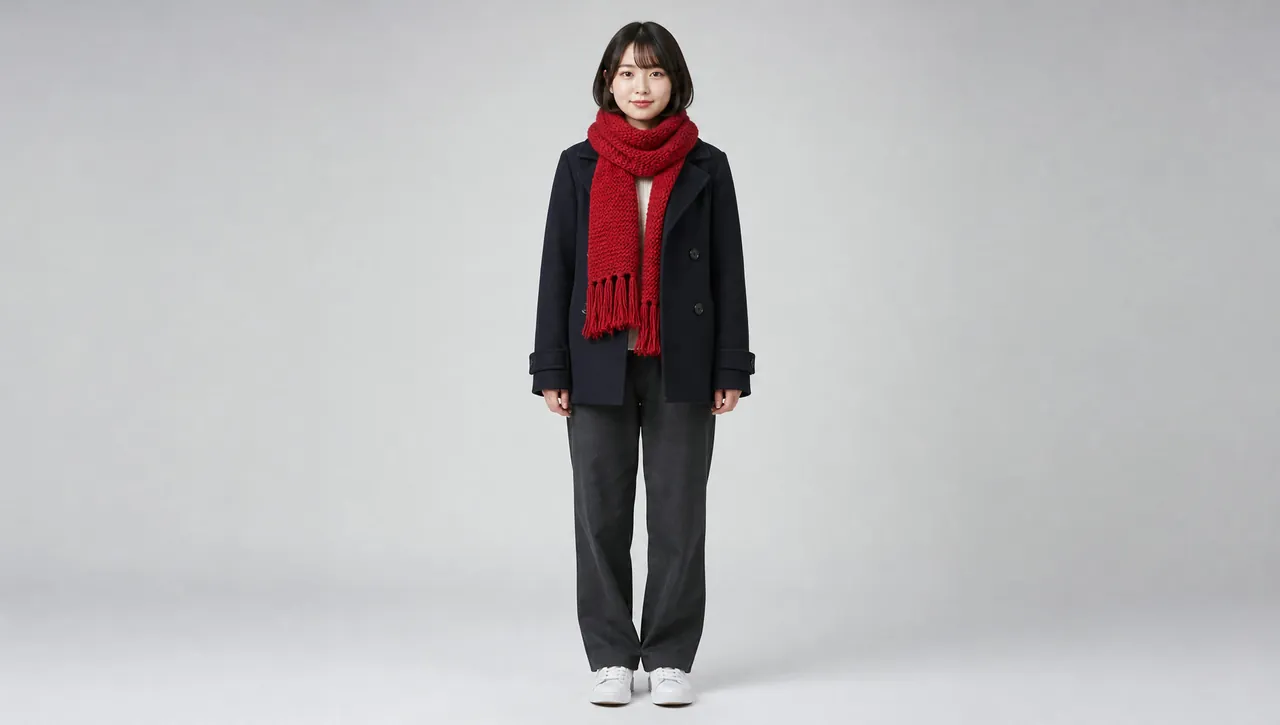 Reference image
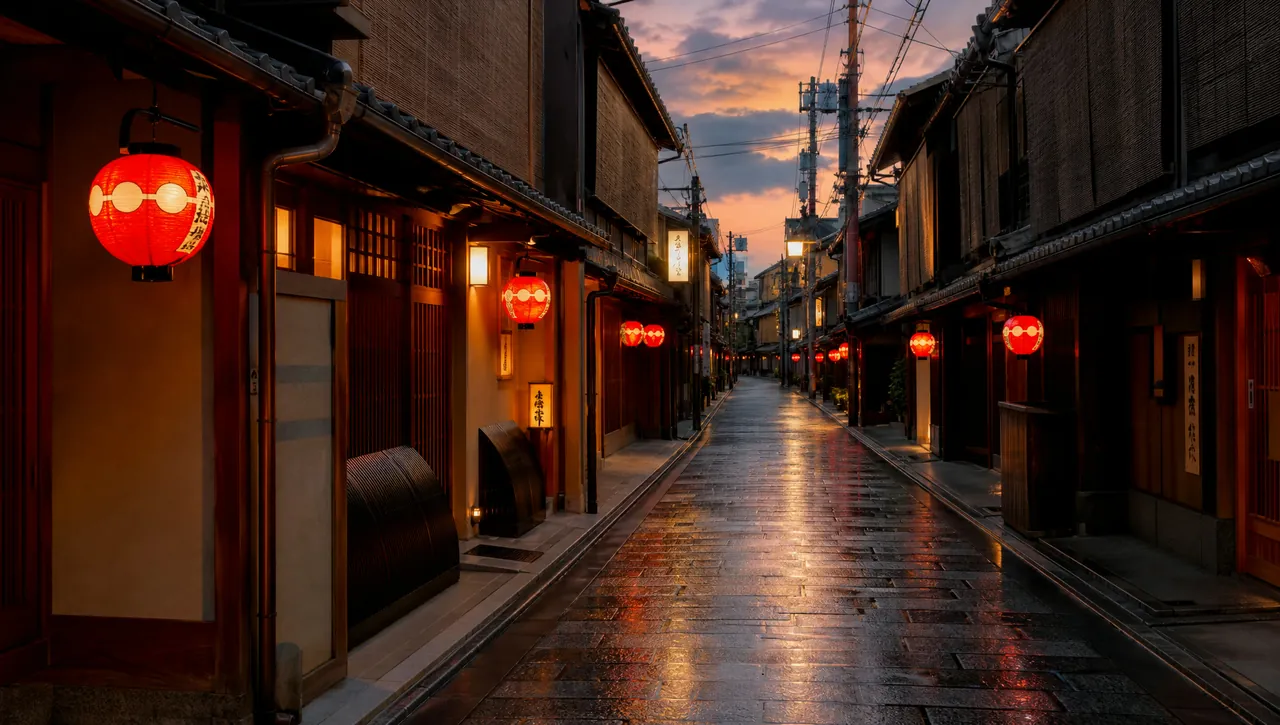 Reference image
Reference to video
Combine images of characters and outfits, reference videos for camera work, and audio for music or dialogue. This is Seedance 2.0's biggest strength.
Prompt
The young woman from the first reference image walks slowly forward through the alley from the second reference image at dusk, red paper lanterns glowing, the camera tracks backward in front of her, soft footsteps and distant koto music
Where Seedance 2.0 shines
- 01
Direction through references
The developer highlights that it can pick up performance, lighting, and camera movement from reference files. Nuances that are hard to put into words can be shown directly with material.
- 02
Picture and sound together
Output already includes ambience and sound effects, so for short-form drafts you can skip adding audio afterward.
- 03
Ratios for every platform
Choose anything from wide 21:9 to vertical 9:16. Try exports for YouTube, Instagram Reels, and TikTok with the same prompt.
How creators use it
Vertical short-form video
Produce a steady stream of few-second hooks with moving products or characters for TikTok and Instagram Reels.
- 9:16
- 720p
- 5s
Concept shots for music videos
Add the track as reference audio to get footage ideas that follow its rhythm, useful at the storyboard stage.
- 16:9
- 1080p
- Reference to video
Cinematic ad shots
Use the wide 21:9 ratio to create shots with the feel of a movie trailer.
- 21:9
- 4K
- 10s
Seedance vs Wan vs MiniMax: AI video models compared
The settings you can choose on AZ8, lined up on the same criteria.
| Feature | Seedance 2.5 | Seedance 2.0This page | Kling 4.0 | Wan 3.0 | MiniMax H3 |
|---|---|---|---|---|---|
| Developer | ByteDance | ByteDance | Kuaishou | Alibaba | MiniMax |
| Max length | 30s | 15s | 30s | 30s | 15s |
| Max resolution | 1080p | 4K | Not selectable | 1080p | 2K |
| Audio | Yes | Yes | Yes | Yes | Yes |
| 21:9 | Yes | Yes | Yes | — | Yes |
| Last frame control | Paired with first frame | Paired with first frame | Paired with first frame | Paired with first frame | On its own |
| Max reference images | 30 | 9 | No stated limit | 10 | 9 |
| Max reference videos | 10 | 3 | 1 | 5 | 3 |
| Max reference audio | 10 | 3 | — | 5 | 3 |
| Extend and edit | Yes | — | — | — | — |
| Open weights | Closed | Closed | Closed | Closed | Open |
Seedance 2.0 prompt tips
The developer does not list supported prompt languages. Writing in English, with standard camera terms, tends to give the intended result. Adjust as you review each output.
One motion per shot
Packing several events into one clip tends to break the motion. Keep each generation to one main action.
A woman turns her head toward the camera and smiles
Name the camera move
Specifying the camera movement in a word or two, like dolly in, pan left, or orbit, makes results more stable.
slow dolly in, handheld feel
Describe the sound too
Since audio is generated at the same time, writing the sounds you want to hear ties them to the picture.
sound of waves and distant seagulls
Seedance 2.0 FAQ
Which company makes Seedance 2.0?
It is an AI video model developed by ByteDance, a Chinese company. AZ8 is a service operated from the United States, and when you use the model through AZ8, the AZ8 Terms of Service apply.
Is Seedance 2.0 free to use?
Creating an AZ8 account is free, but generating videos uses credits. How many depends on the video's length and resolution. See the pricing page for details.
Can I write prompts in English?
Yes. The developer does not list supported prompt languages, but the example prompts on this page are in English, and English camera terms tend to give the intended result.
How long can the videos be?
On AZ8 you can choose 4 to 15 seconds per generation. For longer pieces, generate several shots and join them.
What resolutions can I choose?
AZ8's settings offer 480p, 720p, 1080p, and 4K. The native resolutions published by the developer are 480p and 720p.
Can I use the videos commercially?
Under the AZ8 Terms of Service, you may use the videos you generate commercially as long as you comply with the law, respect third-party rights, and follow any model-specific conditions shown before generation.
How is it different from Seedance 2.5?
Seedance 2.5 is the successor, and on AZ8 it supports generations up to 30 seconds plus video extension and editing. If you are crafting shots of 15 seconds or less from reference material, Seedance 2.0 is still a solid choice.
How do Seedance 2.0 Fast and Mini differ?
Seedance 2.0 Fast and Seedance 2.0 Mini are variants in the same Seedance 2.0 family. AZ8 offers each as a separate model, which you can pick from the model list in Studio.
Try it right in your browser.
Signing up is free. Generating videos uses credits.