AI video model by Alibaba
Wan 3.0: 30 seconds, one continuous shot.
Alibaba's AI video model makes up to 30 seconds in a single generation. You can show how a scene unfolds without stitching shots together, which suits longer explainers and single-scene stories. Generate with audio at up to 1080p, right in your browser.
You need to sign in to generate. Whatever you enter carries over after you sign in.
- Up to 30s
- Up to 1080p
- With audio
- 5 aspect ratios
Last updated AZ8 Editorial Team
What is Wan 3.0?
Wan 3.0 is an AI video model from Alibaba, officially launched in August 2026. It generates videos with audio from 2 to 30 seconds long, and it can combine images, video, and audio as reference material. Its official docs list Chinese and English as prompt languages.
Key takeaways
- Up to 30 seconds per generation, tied with Seedance 2.5 as the longest of the four models compared
- Image to video accepts up to 10 images at once
- Reference media: up to 10 images, 5 videos, and 5 audio clips
Best for
- You want one continuous scene instead of separate cuts
- You want several photos of a product or character to keep its look consistent
- You also need short loops of about 2 seconds from the same model
Wan 3.0 videos generated on AZ8
Every clip here was generated on AZ8 by our editorial team, with the prompt and settings shown exactly as used.
Running along the Kamakura coast (15s)
- 16:9
- 720p
- 15s
Prompt
A long tracking shot following a high school girl running along a seaside road in Kamakura on a summer afternoon, a small green and cream train passes behind her, cicadas and wind sounds, bright natural light
A summer festival in one take (30s)
- 16:9
- 720p
- 30s
Prompt
One continuous shot through a Japanese summer festival at night: the camera drifts past yakiniku and goldfish scooping stalls, children in yukata with sparklers, then rises to reveal fireworks over the river, festival drums and crowd ambience
A paper crane leaves the classroom (10s)
- 16:9
- 720p
- 10s
Prompt
A paper crane unfolds and flies out of a classroom window into a blue sky, the camera follows it over tiled rooftops, gentle piano music
What you can do with Wan 3.0
There are four generation modes, and every one of them lets you choose a length from 2 to 30 seconds.
- Text
Text to video
Thirty seconds is enough to fit a beginning, a development, and an ending into one prompt. The trick is to describe events in the order they happen.
Prompt
A paper crane unfolds and flies out of a classroom window into a blue sky, the camera follows it over tiled rooftops, gentle piano music
- Image
- Text
Image to video
Pass in up to 10 images. The first one is the starting point, and the others keep a person or product looking consistent as it moves.
Prompt
Bring the photo to life: the woman looks up from her book, the curtain sways in the breeze, warm afternoon light
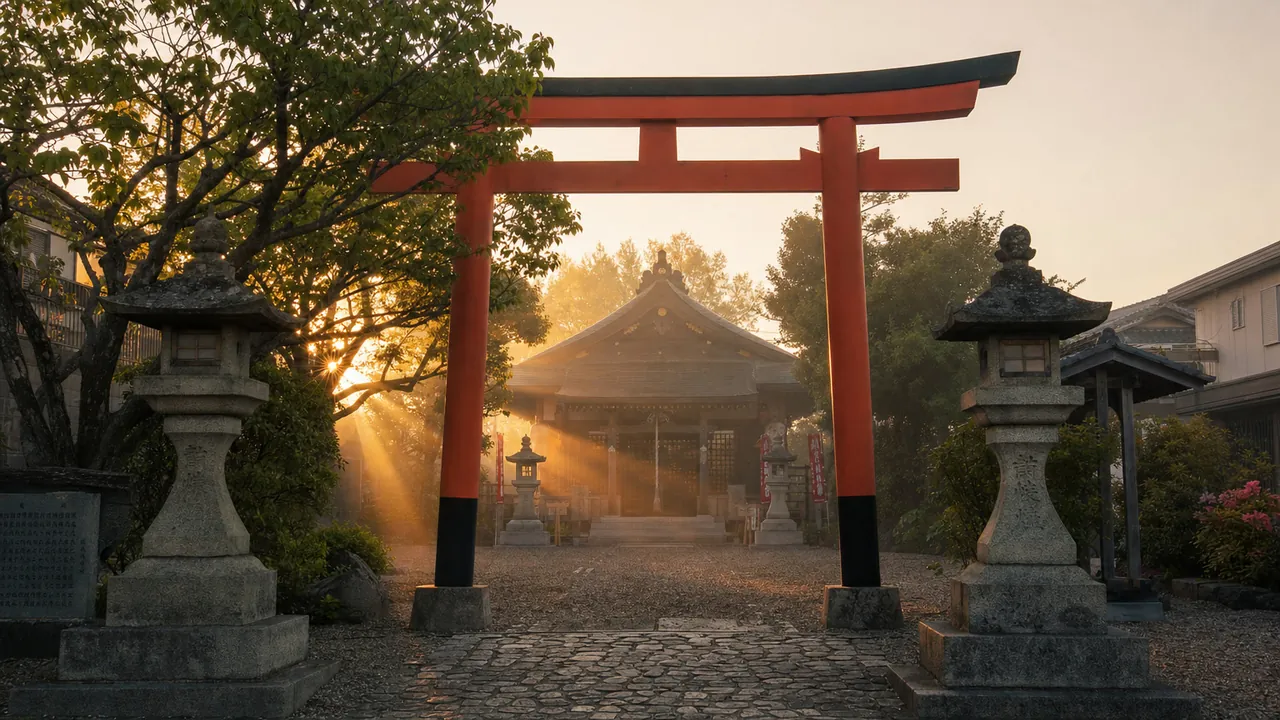 First frame
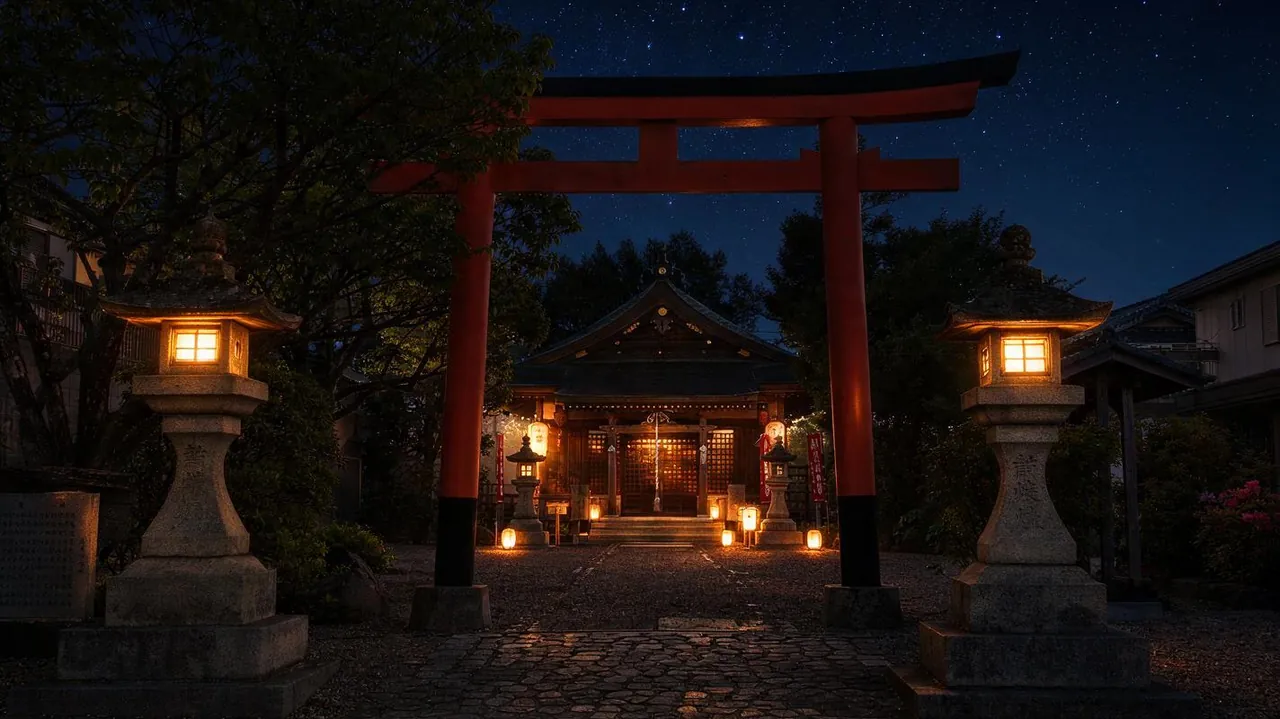 Last frame
First and last frame to video
The first frame is required and the last frame is optional. Add a second image only when you want to fix how the shot ends.
Prompt
Time-lapse from sunrise to deep night over the shrine courtyard, the golden light fades to blue, stars appear and the stone lanterns and paper lanterns light up one by one, fixed camera, gentle wind and a distant temple bell
- Image
- Video
- Audio
Reference to video
Mix up to 10 images, 5 videos, and 5 audio clips. The prompt is optional, so the material alone can set the direction.
Prompt
Combine the characters from the reference images and the background music from the reference audio into one scene
Where Wan 3.0 shines
- 01
30-second long takes
Generate a single shot where the camera travels from place to place, or a short story with a clear arc, with no seams.
- 02
A consistent look from multiple images
Image to video can reference up to 10 images, so photos from different angles help keep a person or product recognizable.
- 03
Lengths from 2 seconds
Make anything from a 2-second loop to a 30-second clip with the same model.
How teams use it
30-second product explainers
Create a loop for a website hero or a trade show booth as one continuous flow with no scene cuts.
- 16:9
- 1080p
- 30s
Product variants for online stores
Pass in product photos in different colors or from different angles together, and add motion while the look stays consistent.
- 1:1
- 720p
- Image to video
Short social loops
At 2 to 4 seconds, make moving images that work in place of a static thumbnail on a post.
- 9:16
- 720p
- 3s
Seedance vs Wan vs MiniMax: AI video models compared
The settings you can choose on AZ8, lined up on the same criteria.
| Feature | Seedance 2.5 | Seedance 2.0 | Kling 4.0 | Wan 3.0This page | MiniMax H3 |
|---|---|---|---|---|---|
| Developer | ByteDance | ByteDance | Kuaishou | Alibaba | MiniMax |
| Max length | 30s | 15s | 30s | 30s | 15s |
| Max resolution | 1080p | 4K | Not selectable | 1080p | 2K |
| Audio | Yes | Yes | Yes | Yes | Yes |
| 21:9 | Yes | Yes | Yes | — | Yes |
| Last frame control | Paired with first frame | Paired with first frame | Paired with first frame | Paired with first frame | On its own |
| Max reference images | 30 | 9 | No stated limit | 10 | 9 |
| Max reference videos | 10 | 3 | 1 | 5 | 3 |
| Max reference audio | 10 | 3 | — | 5 | 3 |
| Extend and edit | Yes | — | — | — | — |
| Open weights | Closed | Closed | Closed | Closed | Open |
Wan 3.0 prompt tips
Wan 3.0's official docs list Chinese and English as prompt languages, so you can write your prompts in plain English.
Write in time order
For long clips, describe what happens first and what follows, in sequence. The plot is more likely to unfold as intended.
First, ... Then, ... Finally, ...
Pick one camera move
Changing the camera work again and again within 30 seconds tends to make things unstable. Choose one basic move, like following or circling the subject.
the camera follows the subject from behind
Keep text out of the frame
Signs and captions tend to come out garbled. Ask for something like a sign without any text, and add the words in editing.
a shop sign without any text
Wan 3.0 FAQ
Which company makes Wan 3.0?
Wan 3.0 comes from Alibaba, a Chinese company. AZ8 operates from the United States, and using the model through AZ8 means the AZ8 Terms of Service apply.
Is Wan 3.0 free to use?
Signing up for AZ8 costs nothing, while each generation spends credits. The amount depends on length and resolution, and the pricing page has the details.
How long can the videos be?
On AZ8 you can choose 2 to 30 seconds per generation. The range is the same in every generation mode.
What resolutions can I choose?
You can choose 480p, 720p, or 1080p. The default is 1080p.
Can I write prompts in English?
Yes. The official docs list Chinese and English as prompt languages, so English prompts are documented by the developer.
Can I run Wan 3.0 locally?
As of October 2026, we could not find any official page confirming that the Wan 3.0 weights have been released. Alibaba Cloud offers it as an API. The previous generation, Wan 2.2, has public weights and runs locally. To use Wan 3.0 without a GPU, AZ8 lets you generate from your browser with nothing to install.
Can I use the videos commercially?
Under the AZ8 Terms of Service, you may use the videos you generate commercially as long as you comply with the law, respect third-party rights, and follow any model-specific conditions shown before generation.
How is it different from Wan 2.7?
Wan 3.0 is the successor, and on AZ8 it supports generations up to 30 seconds. Wan 2.7 is also available on AZ8 as a separate model.
Try it right in your browser.
Signing up is free. Generating videos uses credits.